tg-mpv-bot: My TV's Remote Is Now Telegram
I rebuilt my Telegram→mpv homeserver hack into a standalone open-source bot: browse the library with inline buttons, stream any link, forward 2 GB Telegram files to the TV — plus the networking war stories (broken IPv6, IP-locked CDNs, an MP4 that deadlocked a pipe) that shaped its architecture.

My homeserver sits in the living room with an HDMI cable to the TV. A while back I wired mpv up to Telegram through the Hermes agent — a shell script, some YAML, quick commands. It worked, and I was happy. The machine behind it is the old ThinkPad setup from my living-room home server article.
Then I kept wanting more: browse the library with buttons instead of remembering names, send a YouTube link and have it just play, forward a video file from a chat straight to the TV. None of that fits comfortably in a shell script behind an LLM gateway. So I extracted the whole thing into a standalone bot and went on a building spree.
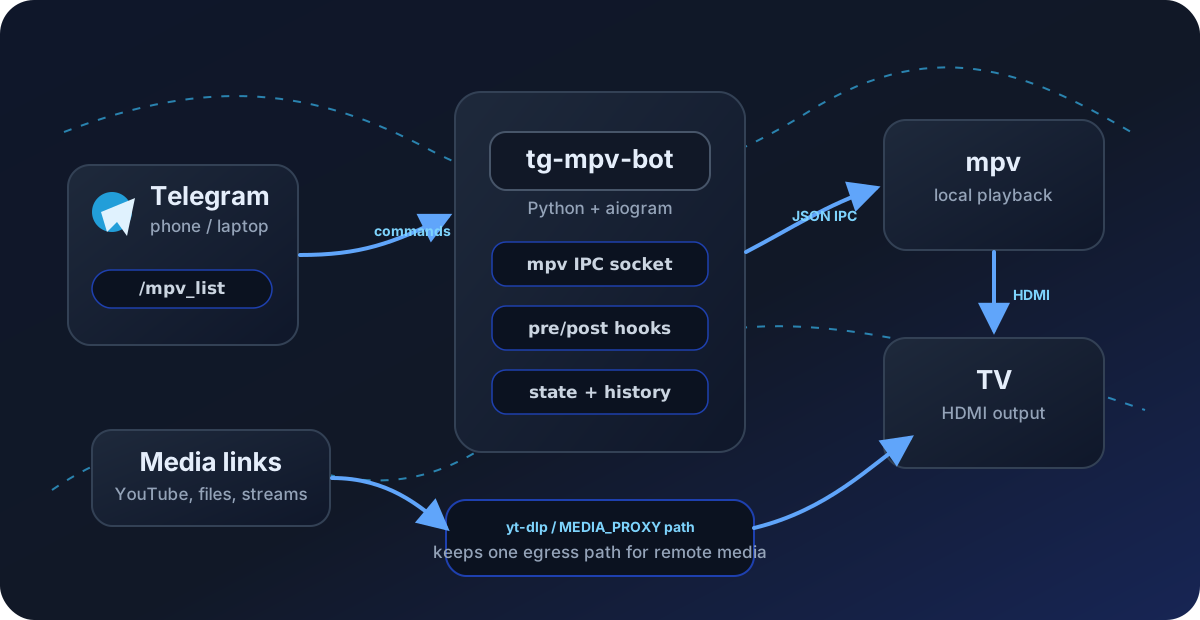
The result is tg-mpv-bot — a self-hosted Telegram bot that turns any Linux box plugged into a TV into a media center. No cloud, no AI, no port forwarding, no smart-TV apps: the bot talks to mpv’s JSON IPC socket directly and only makes outbound connections.
This post is about what it became and — more interesting — what broke along the way. The networking section alone cost me a night of my life.
What it does now
Around forty commands, but the daily loop is small:
/mpv_list— the library as inline keyboards (category → playlist), with a ”▶ Continue: last watched” row on top. Episode picker, chapter picker, full-text search, “play something random”.- Send a link — YouTube, SoundCloud, Instagram, whatever yt-dlp eats —
and it plays on the TV. Subtitles get fetched automatically;
/mpv_yt <query>searches YouTube right from chat with thumbnail results. - Forward a video file — up to 2 GB with a local Bot API server — and it plays.
- A now-playing panel with the whole transport as buttons: pause, seek-to-%, volume, speed, audio/subtitle tracks.
- Quality-of-life: watch history with one-tap replay, stream positions that
survive restarts, ”⏭ Now playing: 6/12” notifications when an episode ends
naturally, a sleep timer, loudness normalization for late-night viewing,
and a
/mpv_healthscreen for the inevitable “why is it not working”.
Under the hood it’s Python + aiogram, packaged with
uv, tested against a real mpv --idle
instance in CI, with releases auto-published to GitHub and ghcr on tag push.
Architecture in one paragraph
Everything routine — pause, seek, volume, track switching, chapter jumps —
is a JSON command written straight to mpv’s Unix IPC socket
(--input-ipc-server). The bot only ever spawns a process to launch
playback, and that path runs through pre/post-play hooks
(PRE_PLAY_HOOK="i3-msg workspace 10" — window-manager glue lives in your
config, not in the bot’s code). A persistent listener on the same socket
watches mpv’s event stream for the notifications and position checkpoints.
That’s it.
The war stories
1. The i3 socket that lied
The old setup hardcoded I3SOCK=/run/user/1000/i3/ipc-socket.2012. Spot the
bug: that 2012 is i3’s PID, baked into the path. Every reboot, new PID,
dead socket, and the workspace switch silently stopped working. The fix was
to delete the feature: the bot now has generic launch hooks, and i3-msg
finds its own socket via X11. If a config value contains a PID, it’s not a
config value — it’s a time bomb.
2. The yt-dlp networking saga
URL streaming looked like a one-evening feature: mpv has yt-dlp integration built in, just pass the URL. Reality disagreed for one full night, in layers:
Layer 1 — cookies. I enabled cookies-from-browser=firefox globally so
gated sites would work. Logged-in YouTube cookies turn out to make yt-dlp’s
extraction stall for ~45 seconds per video. Cookies are now applied only to
hosts that need them, plus a one-shot escalation when YouTube throws its
“confirm you’re not a bot” page.
Layer 2 — stale extractors. YouTube breaks yt-dlp every few months and
distro packages lag. The bot now keeps a nightly build inside its own venv,
prefers it over the system one, exposes /mpv_update_ytdlp (one tap from the
couch when YouTube changes something), and can auto-update weekly.
Layer 3 — the split brain. My proxy TUN captures IPv4 only: v4 egress goes through the tunnel, v6 goes out the raw ISP line. Why does that matter? Because googlevideo URLs are IP-locked to the address that minted them. yt-dlp resolves a URL over one path, mpv fetches it over the other, and the CDN tarpits the mismatch. The “fix” of forcing IPv6 broke SoundCloud outright (their CDN has no AAAA records). Every probe of this onion revealed another layer.
Layer 4 — the actual root cause. After enough flailing I did the measurement I should have started with:
curl -4 https://<media-cdn> → 200 in 0.5s (through the tunnel)curl -6 https://<media-cdn> → TLS handshake timeout (ISP line)My ISP’s IPv6 simply cannot reach half the media CDNs on the internet. Every “mysterious” failure — probes timing out, mpv stalling, what I had misdiagnosed as rate-limiting — was traffic accidentally landing on v6.
The architecture that finally holds:
- YouTube →
yt-dlp -o - | mpv -. yt-dlp does all the fetching (same shape as a plain download, which provably works), so IP-locked URLs never leave the process that minted them. Split video+audio formats can’t share one pipe — interleaved bytes are garbage — so each stream gets its own fd and mpv muxes them. - Everything else → the resolved URL goes to mpv directly, and both
the yt-dlp probe and mpv’s fetch ride one explicit proxy (
MEDIA_PROXY, yt-dlp--proxy+ mpv--http-proxy). One egress end to end; IPv6 never consulted.
3. The MP4 that ate 600 MB and showed nothing
Why not pipe everything, then? Because of one video from a generic hosting
site that “worked fine with plain mpv <url> on my laptop” and showed a
black nothing through the bot. The logs told a beautiful story: yt-dlp had
pushed hundreds of MB through the pipe, and mpv was still sitting at
Reading from stdin....
The file was a progressive MP4 with its moov atom — the index a player needs to begin — at the very end of an 858 MB file. Direct playback range-requests the tail and starts instantly. A pipe can’t seek, so mpv was waiting for an index that would arrive last, with a demuxer buffer smaller than the file. A deadlock with a progress bar. That’s the day the hybrid pipe/direct split was born.
4. 2 GB Telegram files and three permission systems
Forwarding video files to the TV sounded trivial — aiogram has
bot.download(). Three rakes later:
- The standard Bot API caps downloads at 20 MB. You need a local Bot API
server, which in
TELEGRAM_LOCALmode doesn’t serve file bytes at all — it returns filesystem paths inside its own container. - So you bind-mount its data dir… and discover the daemon runs as uid 101
and creates
750directories your bot can’t read. The container’s entrypoint must start as root (it chowns and drops privileges), souser:overrides crashloop it. The answer was filesystem ACLs with inheritance — they survive the daemon’s chown dance. - And the file you play stays on disk forever unless someone deletes it, so the bot now garbage-collects old media after each new file — keeping the current one so “continue watching” works.
Also: don’t copy a 2 GB file into /tmp on Arch. /tmp is RAM.
5. Debugging blind
The single dumbest hour of the night: early versions launched mpv with
stderr=DEVNULL. Every failure looked identical — “the bot says it’s
playing, the TV shows nothing.” The moment mpv’s output went to a log file
instead, every remaining bug took minutes instead of hours, because the
error was just sitting there, written out in plain text. Processes you
spawn detached must log somewhere. Non-negotiable.
From hack to product
The fun part of going standalone was the long tail of polish that a personal
hack never gets: a landing page,
pyproject.toml + uv.lock, CI that runs the IPC client against a real mpv
instance on three Python versions, an AUR
package, Docker images on
ghcr, Dependabot with auto-merge for green patch bumps, branch protection,
release automation. The repo now largely maintains itself; I mostly tap
/mpv_update_ytdlp when YouTube sneezes.
The old Hermes setup is still around for natural-language requests (“play something noir”) — but the everyday remote is now a bot that costs zero tokens, plays anything yt-dlp can reach, and fits in a systemd user unit.
Try it
git clone https://github.com/antlis/tg-mpv-bot && cd tg-mpv-botuv synccp .env.example .env # BOT_TOKEN from @BotFather, your ID in ALLOWED_USERSset -a; source .env; set +auv run bot.pyOr yay -S tg-mpv-bot-git on Arch. The
README covers the media
library layout, every env var, and the deployment options. Issues and PRs
welcome — especially if your ISP’s IPv6 works and you find a whole different
class of bugs.