The $300 Living-Room Home Server on an Old ThinkPad T460s
How an old ThinkPad T460s with a dead touchpad became a living-room home server for Telegram bots, music, audiobooks, torrents, NFS storage, and private remote access.
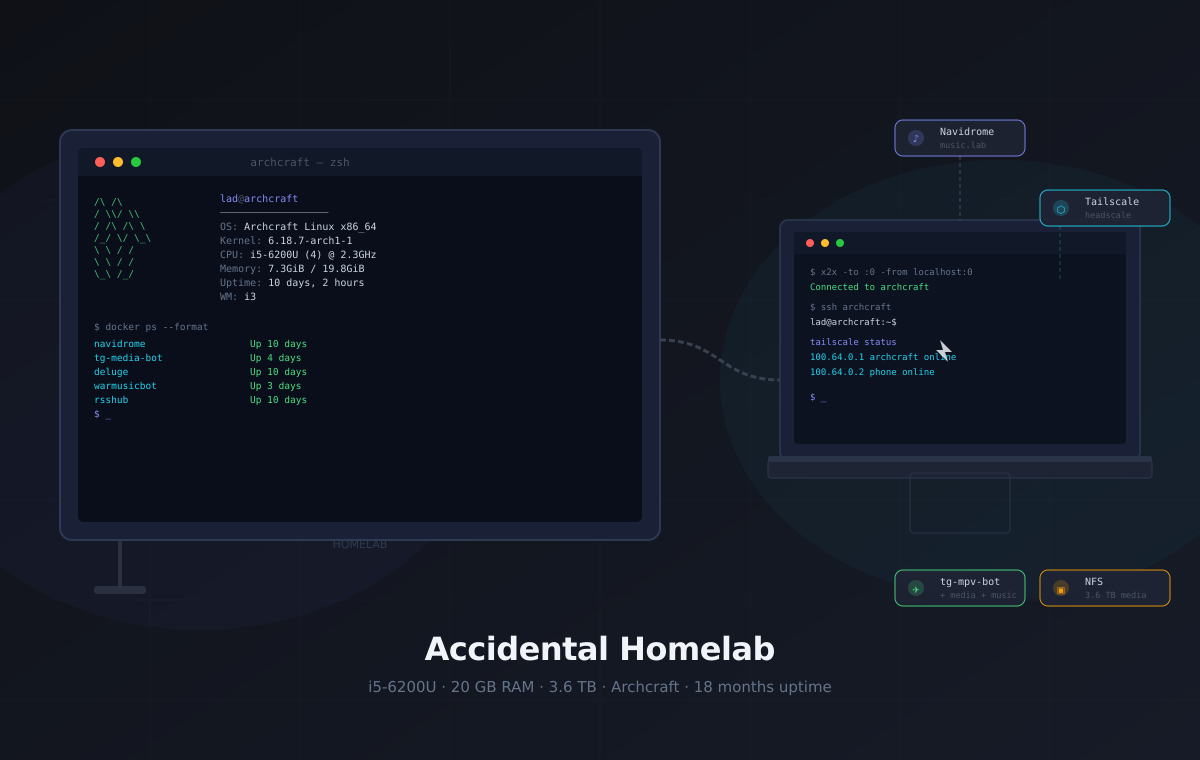
There is an old ThinkPad T460s next to my TV. It sits in a docking station, has two USB drives attached, runs Archcraft, and quietly does enough work that it stopped feeling like a laptop. It is my media box, download box, Telegram bot host, private network entry point, and occasional experiment machine.
I did not plan it as a homelab. I just had a laptop that was still useful, but annoying to use normally.
Around 2019 I bought it from a former employer for $300. It was a ThinkPad T460s: a plain business machine, not new even then. Later the touchpad died. I could probably replace it, but on an old laptop that no longer leaves the TV stand, I do not really care enough to bother. Then I wanted to try Archcraft, mostly out of curiosity. I installed it, liked the minimal i3 setup, plugged the laptop into the TV over HDMI, added a USB keyboard, attached it to a docking station, and let it stay there.
That temporary experiment slowly became the machine that runs my home media, Telegram bots, private network access, and the boring glue around all of it. It grew slowly, one small annoyance at a time.
Home Server or Homelab?
The honest answer is: both, but the center of gravity is a home server.
It is a home server because I rely on it every day. It stores media, runs services, exposes local web apps, handles downloads, controls TV playback, and keeps private access available from my other devices. If it is offline, I notice.
It is a homelab because I still experiment on it. I change how services are deployed, test private networking ideas, move things between Docker and systemd, compare media workflows, and occasionally break something while learning how I want the next version to work.
That distinction matters because it keeps the expectations realistic. This is not a lab full of disposable test nodes, and it is not a production server with formal uptime goals. It is a useful home server that still leaves room for experimentation.
The Machine
The hardware is ordinary, but that is exactly why I like this setup. It proves that a homelab does not need to start with a rack, a server board, or a shopping list.

/mnt/EHDDSG-4Current usage is still comfortable: the root filesystem is around 72% used, the 3.6 TB media disk is around 64% used, and the machine normally sits at a low load average unless something is downloading or transcoding. It has 21 GB of swap too, but most of the time the useful memory is in filesystem cache.
Physically, it is not elegant. It is a laptop near the TV, attached to a docking station, with two USB drives, HDMI, Ethernet, and power hanging from that small cluster. The broken touchpad stopped mattering because it is no longer a laptop in the normal sense. It is a small server with a built-in screen, battery, keyboard, and emergency console.
The docking station is what makes the mess manageable. Ethernet, HDMI, USB storage, keyboard, and power all terminate in one place, so the laptop can be removed or serviced without rethinking the whole living-room cable situation.
The built-in screen and keyboard also matter more than I expected. If the network is misconfigured or a service does not come back, I can walk over to the TV stand and use the machine directly. That is not elegant, but it is a very practical failure mode.
How It Fits Together
The architecture is small enough to fit in one picture:
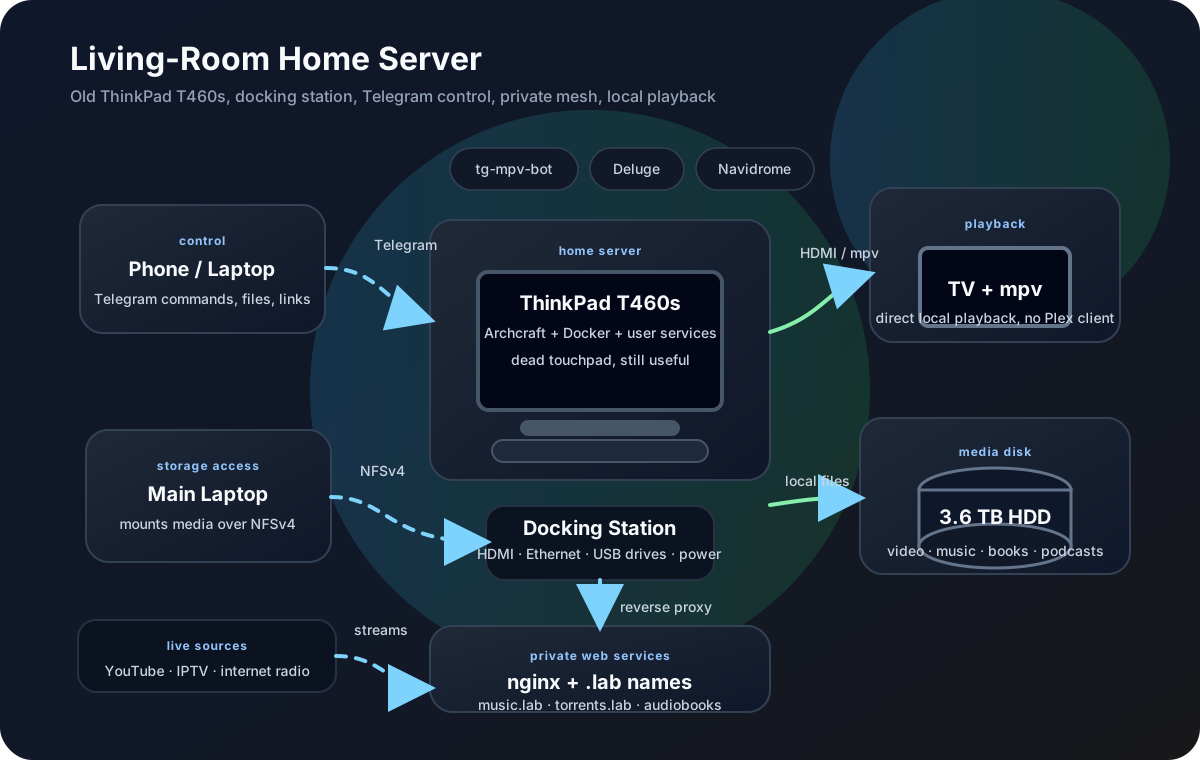
The important part is that the ThinkPad is both server and playback device. It does not stream video to a smart TV client. It runs mpv locally on the machine already connected to the TV. That keeps the media path short and makes the Telegram bot feel like a real remote control instead of a web app pretending to be one.
That direct path is the biggest practical difference from a normal media server. The file is already on the machine. The display is already connected. The player is local. Most of the time there is no separate client, no stream to transcode, and no question about whether the TV app supports the file.
How I Control It
Because it lives in the living room, I avoid treating it like a headless black box. The normal control path is x2x, which shares my main laptop’s keyboard and mouse with the Archcraft X11 session over SSH. I move the cursor past the edge of my laptop display and it appears on the TV.
That sounds like a small detail, but it changes the feel of the whole setup. If a media player is stuck, a browser needs attention, or I want to inspect a desktop app, I do not need a remote desktop session or a second keyboard. I just push the cursor across and fix it.
For shell work, normal SSH is enough. For the rare case where I need a full remote desktop session, xrdp is available, but it is not the daily path.
Storage: A Plain, Useful NAS
The storage design is intentionally boring:
- Internal SSD: system, container state, temporary downloads, and cache.
- Small external HDD: backup target.
- Large external HDD: media library with
video/,music/,books/,audiobooks/, andpodcasts/.
The big drive is shared over NFSv4 to my NixOS laptop on the LAN. I used Samba before, but it kept turning small compatibility details into chores. For Linux-to-Linux file sharing, NFS has been simpler and less fussy.
Torrents land on the internal SSD first. After they finish, I move the files server-side onto the media disk. That keeps the normal download workflow fast and avoids pulling large files through my laptop just to put them back on the server.
There is no RAID and no claim that this is a storage appliance. Important data needs backups. Replaceable media needs organization. That tradeoff is good enough for this machine.
The backup disk is there for things I would actually care about losing: configs, small project data, metadata, and selected personal files. The large media library is treated differently. Some of it would be annoying to rebuild, but not all of it deserves enterprise-style protection. That is the line I draw for this machine: protect the irreplaceable parts first, keep replaceable media organized, and do not pretend an old laptop with USB disks is a NAS appliance.
The SSD is also intentionally a working area, not the long-term archive. Docker state, incomplete torrents, caches, and temporary downloads can churn there without constantly writing into the media library. Finished files move to the large disk after I decide they belong there.
Services
Most services sit behind nginx with short .lab names on my private mesh.
The result feels less like a pile of ports and more like a tiny local platform:
music.lab, torrents.lab, and similar names work from my devices without
opening the services to the public internet.
The services fall into three groups:
- Daily: tg-mpv-bot, Navidrome, Deluge, nginx, NFS, private access.
- Occasional: Audiobookshelf, tg-media-bot, tg-streaming-bot, IPTV, radio.
- Mostly retired: Plex and GitLab, both still useful concepts, neither important enough to be central anymore.
Telegram Bots
The bots are the most personal part of the setup, because they connect the TV, Telegram, and the media library into one workflow.
- tg-mpv-bot controls mpv on the TV from Telegram. I can browse files, send a YouTube link, forward a video, and make the TV play it without touching the machine directly. It runs as a user systemd service because it needs access to the X11 session and mpv IPC socket.
- tg-media-bot downloads media with yt-dlp and sends files back through Telegram. It runs in Docker with a local Telegram Bot API server so large files are practical.
- tg-streaming-bot handles music and video streams for Telegram group calls. It is less central than the mpv bot, but useful when the destination is a voice chat rather than the TV.
This is the part that makes the homelab feel custom instead of generic. A normal media server gives you a library. The bots give me a remote control and a download workflow inside the app I already have open all day.
A normal evening can be as simple as forwarding a video to the bot, searching YouTube from Telegram, or browsing the scanned media folders and telling mpv to play the result on the TV. The important part is not that Telegram is a perfect media UI. It is that the command surface is always in my pocket, works from the same chat history, and does not require opening a separate app just to start playback.
Music: Navidrome
Navidrome indexes the music directory on the big
drive and exposes it through the Subsonic API. On my phone I use Tempo, and on
the mesh the service is available as music.lab.
The important detail is that the music library stays as normal files on disk. Navidrome is an index and playback layer, not the owner of the collection. If I replace the service later, the library remains understandable.
Plex, Mostly Retired
Plex is installed too, and I used it more actively before the Telegram bot workflow took over. These days I rarely open it. Most of my video watching goes through tg-mpv-bot: send a file or link in Telegram, let mpv play it on the TV, and keep the media library as normal folders instead of browsing through a separate media-center interface.
Plex is still better at being a polished media catalogue. It has fancy thumbnails, posters, matching, summaries, cast lists, seasons, and all the extra metadata that makes a library feel like a streaming app.
The Telegram bot wins on control and immediacy. /mpv_scan can scan the media
folders and generate playlists for the whole library, so I still get browsable
categories from Telegram, but playback stays simple: mpv plays directly on the
machine connected to the TV. That usually means no server-side transcoding, no
client compatibility negotiation, and no surprise CPU spike because a subtitle
format or video codec made Plex decide to convert the stream. The same bot also
handles things Plex is not really meant for: random links, forwarded Telegram
files, YouTube search, internet radio through /mpv_radio, and live TV through
/mpv_iptv. Plex is better when I want a rich catalogue. The bot is better
when Telegram is already open and I just want something playing on the TV.
Audiobooks: Audiobookshelf
The audiobook setup is built around
Audiobookshelf. Its compose file mounts
/mnt/EHDDSG-4/data/audiobooks as the audiobook library and
/mnt/EHDDSG-4/data/podcasts as the podcast library, with config and metadata
kept next to the compose project under ~/docker/audiobookshelf.
That is a better fit than serving raw directories. Audiobooks need progress tracking, chapters, metadata, authors, series, and a phone-friendly interface. Plain files are fine for storage; Audiobookshelf is the layer that makes them pleasant to actually listen to.
Torrents: Deluge
Deluge runs in Docker with its web UI at
torrents.lab. The container writes downloads to
~/Downloads/torrents-deluge, with incomplete downloads separated from
finished ones.
I like this split because the torrent client does not need write access to the entire media library. It gets a landing zone. I decide what graduates into the library and where it belongs.
GitLab, Stopped
GitLab exists on the machine, but it is stopped. For one person it is heavy, and public projects already live comfortably on GitHub. If I want a local forge again, I would pick something smaller.
This is one of the useful lessons from running a homelab for long enough: removing a service is also maintenance. Not everything that can be self-hosted deserves to stay running.
Things That Changed Along the Way
The setup is better now because a few earlier choices became annoying enough to replace.
Samba was the first one. It worked until it did not, and the failures were boring: SMB dialects, client behavior, tiny compatibility details. Since my main clients are Linux machines, replacing it with NFSv4 made the storage story simpler.
Plex was the second one. I still respect it as a catalogue, but for my actual TV habits it became extra ceremony. The Telegram bot matches the way I already interact with media: send something, search something, resume something, play something on the TV.
GitLab was the third. It is impressive software, but on a single-user home server it felt too heavy for the value I was getting. Stopping it was not a failure. It was the right maintenance decision.
Private Access
Remote access is built around a Tailscale-compatible mesh with a self-hosted headscale control plane on a Polish VPS. The homelab has a stable mesh address and advertises the home LAN subnet, so I can reach home devices while away without exposing random ports on the router.
Outbound access is routed through AmneziaVPN when needed. That matters because Telegram and related infrastructure can be unreliable from Russia depending on the network path. The bots need stable outbound connectivity more than they need public inbound access.
The practical result is simple: my phone can reach the services by their private names, the bots can reach the outside world, and nginx remains the one front door for local web apps. Getting there — the DPI-blocked handshakes, a DERP relay that silently only worked at home, and a phone that can only run one VPN app at a time — is its own story, told in Reaching the Homelab From Anywhere.
AI as the Patience Layer
One honest reason this setup grew as far as it did: I use AI tools a lot while configuring it.
Before that, I often did not have the patience to fight through every config file, systemd unit, Docker compose detail, nginx rule, and weird Linux edge case. I could do it, but the friction made me stop earlier. With an AI assistant available, I can ask for a first draft, compare it with the real machine, fix the wrong assumptions, and keep moving.
That does not remove the need to understand the system. If anything, it makes the feedback loop tighter: try a config, read the logs, adjust, document what worked. But it changes the emotional cost of experimentation. The homelab grew because the boring config work became less lonely and less tedious.
The Daily Shape of It
The machine is usually boring, which is what I want. It has been up for 10 days at the time of writing, and that is a normal interval between kernel updates. The user services and containers are configured to come back after reboot, so a restart is not a project.
The CPU is old but rarely stressed. The fan does not spend its life screaming. The media drive is the real center of gravity; the laptop is mostly compute, networking, and glue around that disk.
What makes the setup interesting is not raw power. It is the way small pieces line up:
- Telegram becomes a TV remote and download inbox.
- NFS makes the media drive feel local from my main laptop.
- Navidrome gives the music collection a real mobile interface.
- Audiobookshelf turns folders of long audio files into a library.
- The private mesh makes all of it reachable without public exposure.
That is enough. I do not need high availability for a living-room media box. If it reboots, the music pauses and the bots disappear for a minute. That is not a disaster.
What I Would Change
The messy part is not the hardware. It is the accumulated system state.
Archcraft has been pleasant, but over time the machine accumulated too many things that exist because I installed them once and moved on. Some services are Docker compose projects, one important bot is a user service, nginx has its own local history, and the storage mounts are configured by hand.
That is why I want to move it to NixOS.
On NixOS, the machine can be rebuilt from a flake instead of memory. Services, mounts, users, firewall rules, packages, and user-level units can be expressed as code. If an update breaks something, I get previous generations and rollback instead of archaeology.
The plan is not to touch the media disk. The data is the valuable part, and it should survive the OS change unchanged. The migration is about replacing the SSD install, declaring the current services, and turning the homelab from “this is what the machine happens to contain” into “this is what the repo says the machine is.”
I would also like to make the physical setup less awkward. The docking station helps, but two external drives, HDMI, Ethernet, and power still create a small cable nest next to the TV. A cleaner drive enclosure or a more deliberate shelf would probably improve the setup more than a faster CPU would.
The touchpad is not a priority. It is broken, and I could probably replace it, but this machine no longer needs to behave like a portable laptop. For this role, a working keyboard, screen, dock, Ethernet, and storage matter much more.
What I Learned
This homelab started because I had an awkward laptop and a free HDMI port. That is still the best part of it.
Purpose-built hardware would be cleaner. A real NAS would be safer. A rack would look better in a blog post. But none of that was required to get useful services running at home.
The real lessons are smaller and more practical:
- Old business laptops make good home servers because they already include a screen, keyboard, battery, Wi-Fi, Ethernet through a dock, and enough CPU for boring services.
- Direct playback beats media-server complexity when the same machine is already connected to the TV.
- Plain folders are underrated. Fancy libraries are nice, but the files should still make sense without the app.
- Services should earn their RAM. If something is heavy and rarely used, it probably does not need to be running.
- A homelab does not need to be impressive to be useful. It just needs to solve real problems and leave room for experiments.
If you have an unused laptop, a spare disk, and one real problem you want to solve, that is enough to start. The rest can grow slowly, one service at a time.
It is a server because I rely on it every day. It is a lab because it keeps changing.