UnbloatedTube: I Wrote My Own YouTube Client to Stop Hoarding Tabs
DraftMy browser was full of YouTube tabs I meant to watch later and never did. After a video about GPUI made me curious, I built a small desktop client in Rust with an AI assistant: mpv for playback, yt-dlp for data, a real Watch later tab, an Up next queue, and a settings page where every piece can be switched off.
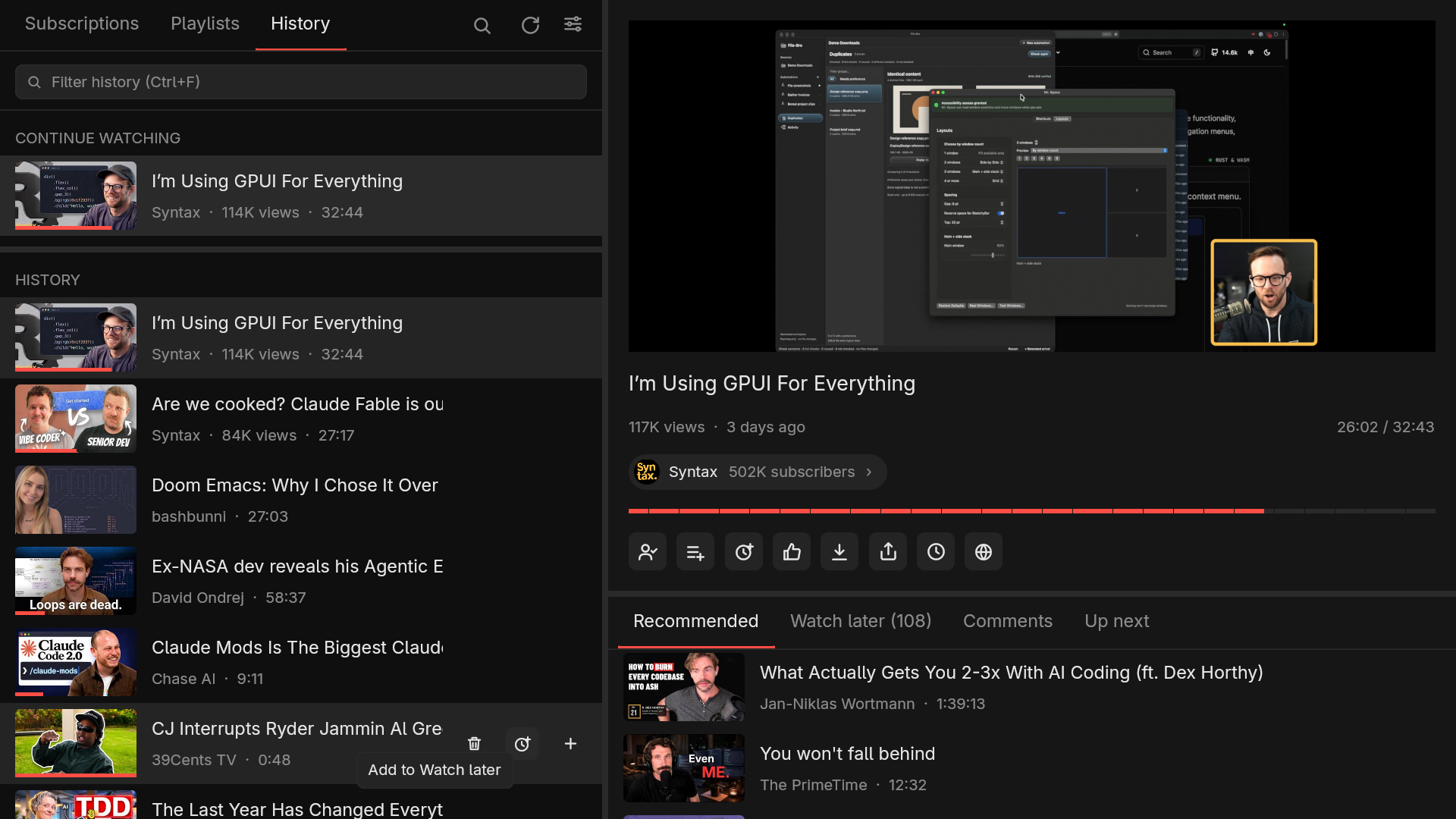
My browser is permanently polluted with YouTube tabs. Every time I see something I want to watch, I open it in a new tab “for later” instead of doing anything that would actually save it. The tabs pile up, and then I forget about most of them. Then I do it again.
I also never liked the YouTube page itself. Whatever I came for, there is a feed, a sidebar and a row of suggestions competing for the same few square inches. So I did what I usually do with an annoyance that is small enough to fix: I wrote a tool for it.
The result is UnbloatedTube (it started out as unbloated-youtube), a small desktop YouTube client for Linux. It shows your subscriptions, playlists and history, plays video in mpv, and keeps “watch later” as an actual list instead of a graveyard of tabs.
Where the idea came from
It started with a video. I watched I’m Using GPUI For Everything from Syntax. GPUI is the Rust UI framework behind the Zed editor, and I had only known it as “the thing Zed is made of”. Watching someone use it for everything, not just an editor, made me curious enough to want to try it myself.
A framework you have only watched a video about is not much use, so I needed a project. The tab problem was right there. I opened a repository, started a session with an AI coding assistant (Claude Code), and described what I wanted: a window where I can browse YouTube, play a video, and put things in a list instead of a tab.
The first version was a window that could play a video. The part that turns a demo into something I actually use every day took many more sessions, and that is most of this article.
What it is
The whole idea is to reuse what already exists instead of reimplementing it:
- GPUI draws the interface.
- mpv plays the video. It is embedded in the window, so playback feels like part of the app.
- yt-dlp supplies the data: lists of videos, search results, stream URLs.
- YouTube’s InnerTube API handles actions that change your account: subscribe, like, save to a playlist, Watch later. It signs in with your browser’s YouTube session, so the app never sees a password (more on that below).
Everything slow, whether it is yt-dlp, a network request or an mpv query, runs on a background thread, so the interface never waits. Lists are cached on disk and appear instantly the next time, then refresh behind the scenes.
Configure what you need, hide what you don’t
“Unbloated” here means something specific: the app does not decide for you which parts of YouTube you want to see. Nearly every element is a switch on the settings page, and there is a search field on that page too, because there are enough switches to need one.
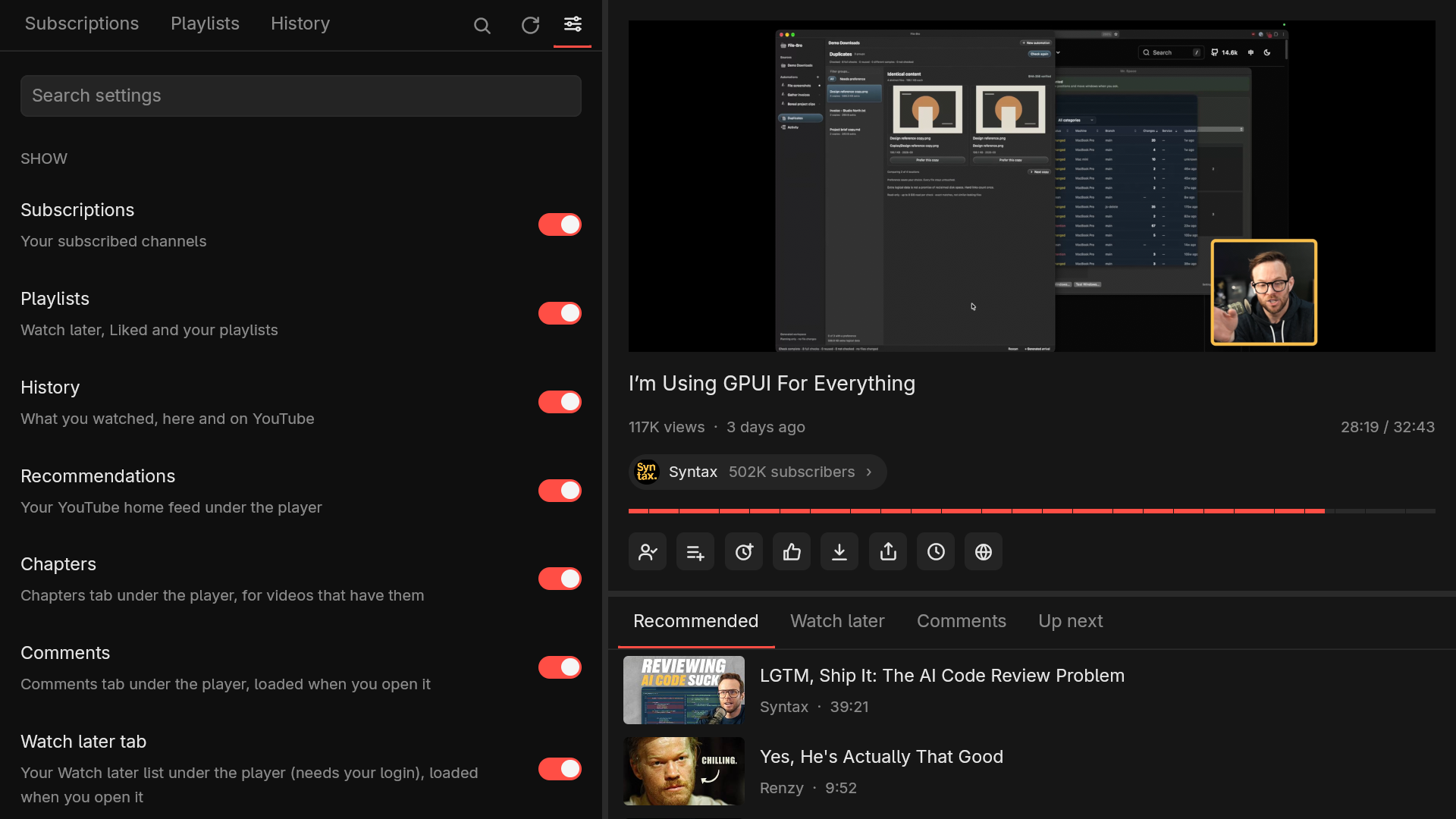
Do you not want recommendations under the player? Turn them off. Comments are off by default and only load when you open their tab. Each action button (subscribe, like, dislike, share, download, open in browser) has its own switch, and so do view counts, upload dates and subscriber counts. If a part of the interface does not earn its place for you, it goes away.
Watch later instead of more tabs
This is the feature the whole thing was built for.
- A Watch later tab next to Recommended, Comments and Up next. It is your real YouTube Watch later playlist, loaded when you open the tab, with a remove button on every row.
- A Watch later button on every video, in every list. Hover a video in your subscriptions, in search results, in recommendations or in history and click it. You don’t have to open the video first, and you never open a new tab. There is also a hotkey for the video that is playing.
- An Up next queue for “this one next”. Add anything with the
+on its row, and autoplay works through the queue before it falls back to the list you picked the video from.
Two more buttons I use constantly: Download, which saves the video through yt-dlp, and Open in browser, for the rare video that really needs the YouTube page. Both are one click or one key, and neither changes anything else in the window.
The same list-first approach goes further. Subscriptions are a plain channel list with the channels that have new uploads at the top and an unseen count next to each. You can sort channels into your own groups (Music, Tech) and filter the feed by group. Groups live only in the app, not on YouTube. History remembers where you stopped in every video and offers “Continue watching”.
Built for the keyboard
Much of my day is spent in a terminal, so the app had to work without a mouse. Playback has the keys you
would expect (space, arrows, j and l for ten seconds, f for fullscreen, m to mute), ?
lists all of them, and the number keys switch tabs.
There is also an optional Vim mode. It adds j/k movement in lists and a hint mode in the
style of Vimium: press f and every clickable thing gets a
short label. Type the label to click it.
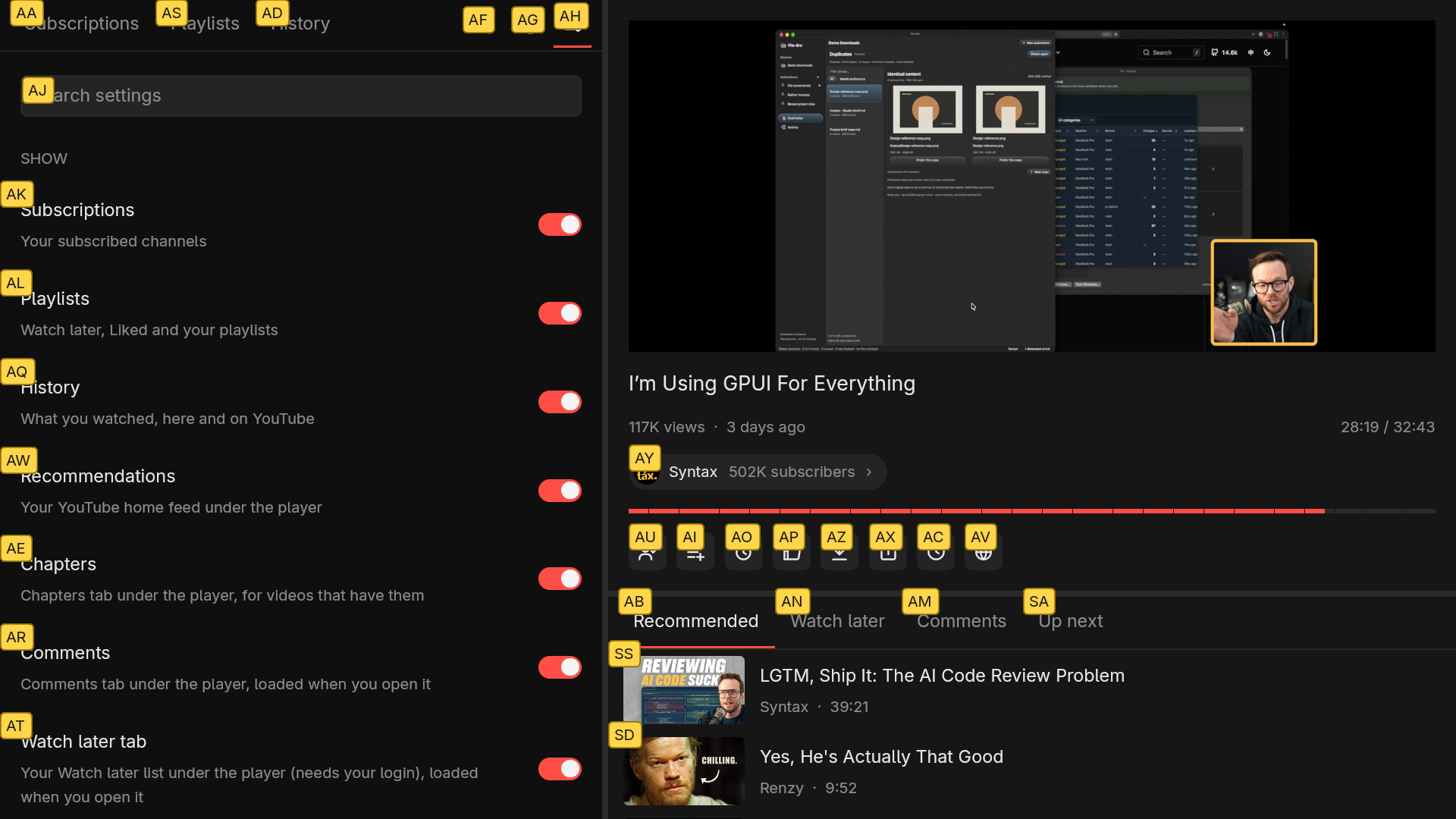
That makes anything reachable, including parts of the window I would never have bound a dedicated shortcut to.
Accessibility: a visible focus ring
Hint mode is for people who like it. Focus handling is for everyone. Tab and Shift+Tab move a
visible ring through every button, row and switch, and Enter or Space presses whatever has
the ring. Esc clears it.
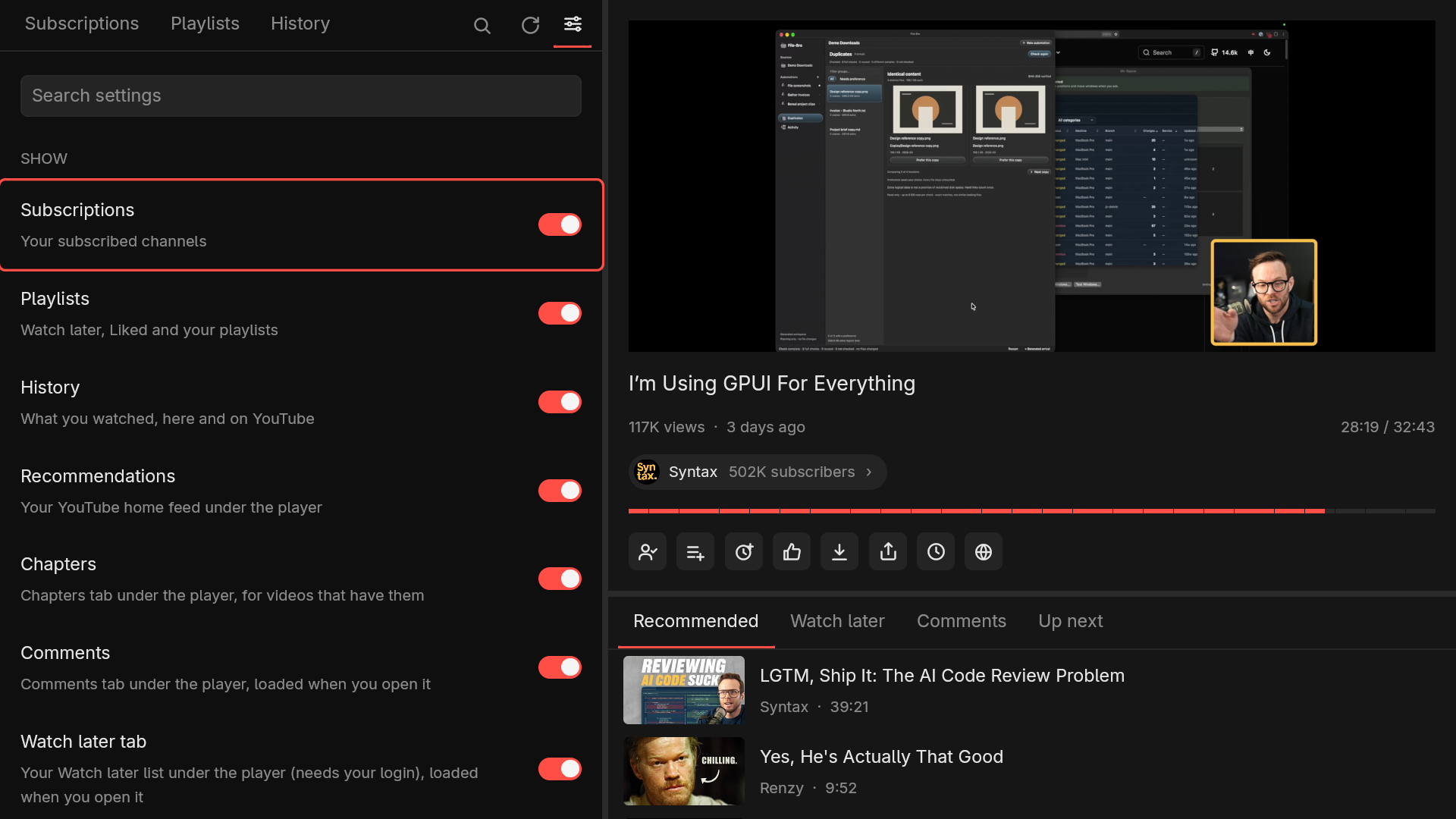
I did not want a client that only works for someone who happens to like my keybindings, and a ring you can always see is the cheapest way to make sure a keyboard user is never lost.
Building it with an AI assistant
I want to be straight about how this was made. Most of the Rust was written by the assistant. My part was deciding what the app should do, trying it in the real app and saying what was wrong. That workflow has some specific consequences:
- There are no automated tests. The assistant checks UI changes by running the app on a private
X display, driving it with
xdotooland taking screenshots, then looking at the screenshots. That is slower than unit tests and catches things unit tests never would, such as a menu hanging off the bottom of the window. - My bug reports were screenshots. Most of the fixes started with me pasting a picture and saying “this is wrong”.
- I had to keep deciding what the app is. An assistant will happily add a feature for every idea. The settings page exists because I kept asking for things to be optional.
A few problems were instructive:
- The video is not my window. On X11, mpv draws into its own native child window, placed over the video area. GPUI cannot draw on top of it, so any menu or tooltip that reaches into the video is hidden behind it. I kept finding new ones. Menus are now kept inside the left column, and the save-to-playlist overlay hides the video while it is open, but tooltips over the video are still a known limit.
- My window was bigger than my screen. It opened at a fixed size, and with display scaling that could be taller than the screen, which pushed the bottom of the right column (including a “Load more comments” button) off the edge. It now opens no bigger than the screen.
- Comments are awkward. yt-dlp cannot stream comments, so “Load more” refetches from the top with a higher limit, and every click is slower than the last. A proper fix means talking to InnerTube directly.
- Compile time. The dependency tree has about 730 crates, mostly from GPUI. A clean Nix build took 26 minutes on my machine. Nobody should have to wait for that, so a GitHub Actions workflow builds the binary in about seven minutes whenever I push a tag.
Installing it
You need mpv and a recent yt-dlp (YouTube breaks old ones quickly); deno too, which yt-dlp
uses to solve YouTube’s JavaScript challenges. Then pick one:
yay -S unbloatedtube-binnix run github:antlis/UnbloatedTubeOr grab the Linux x86_64 tarball or the AppImage from the releases page. The AppImage carries its own yt-dlp and deno as a fallback, so mpv is the only thing left to install. Releases are cut by a tag: the workflow builds everything, publishes the release and updates the AUR package, so the AUR copy tracks GitHub without me touching it.
Search and playback work without an account. For subscriptions, playlists, history and the account buttons, the first run offers Connect YouTube: pick the browser you are signed in with, and the app reads that browser’s YouTube session and checks it. No password is asked for or stored, and you stay signed in in the browser.
What changed since the first version
The first draft of this post ended with a wishlist. Most of it got built:
- Wayland. X11 lets mpv draw into a child window; Wayland has no such thing. So on Wayland the
app runs mpv as a library (
libmpv) inside its own process and draws the video into a subsurface of its window with OpenGL. It notices which one it’s on by itself. - Casting. Any command can be a cast target —
cattfor a Chromecast is one line. But the version I wanted most was my own TV box running tg-mpv-bot: the app talks to its HTTP API, sends the video (or a whole playlist, or the Up next queue), and then the usual keys and the progress bar drive the TV instead of the local player. - A real login flow instead of a line in
config.toml— the Connect YouTube screen above. - Description and transcript tabs. Timestamps in descriptions and comments seek the video; the transcript is searchable, and clicking a line jumps there.
- Less noise, optionally. Shorts can be switched off everywhere, SponsorBlock skips sponsor segments, DeArrow replaces clickbait titles and thumbnails, and Return YouTube Dislike brings the dislike count back.
- More ways to install it: the AppImage and the Nix flake joined the tarball and AUR.
- A new name. unbloated-youtube became UnbloatedTube (
unbloatedtube, or justubt). The old command, AUR package and Nix output still work as aliases.
One feature I didn’t plan for at all: in places where YouTube is throttled, videos just hang. Settings → Network has a Bypass slowdown mode that does what ByeDPI and zapret do, built in: the filter recognizes YouTube by the server name in the first packet of each TLS connection, so the app splits that packet right inside the name. The filter doesn’t see it; YouTube’s servers reassemble it and notice nothing. There’s also a plain Proxy mode for Tor or ByeDPI, and a Test connection button that says why a route doesn’t work.
What’s next
It’s still alpha. Open items, roughly in order:
- Windows and macOS. All OS-specific code already lives in one module, but the embedded player is the hard part, and nothing has been attempted yet.
- Better comments: replies, sorting, and paging through InnerTube instead of refetching from the top on every “Load more”.
- Playlist management: creating, renaming and reordering playlists, not just adding to them.
- Export and import of settings and channel groups, which today live in one folder on one machine.
- Opening YouTube links from other programs in the app instead of the browser.
I’ve stopped watching YouTube in the browser, which was the whole point. If you try it and something breaks, open an issue — the README lists every feature and shortcut.