brave-rofi-rust: Switch Browser Tabs From Any Window
A Rust + rofi menu that switches browser tabs, bookmarks, and history from any window on i3 — not just when the browser is focused. It drives Brave over the Chrome DevTools Protocol and hands window-raising to a hook, so one keybind works everywhere.
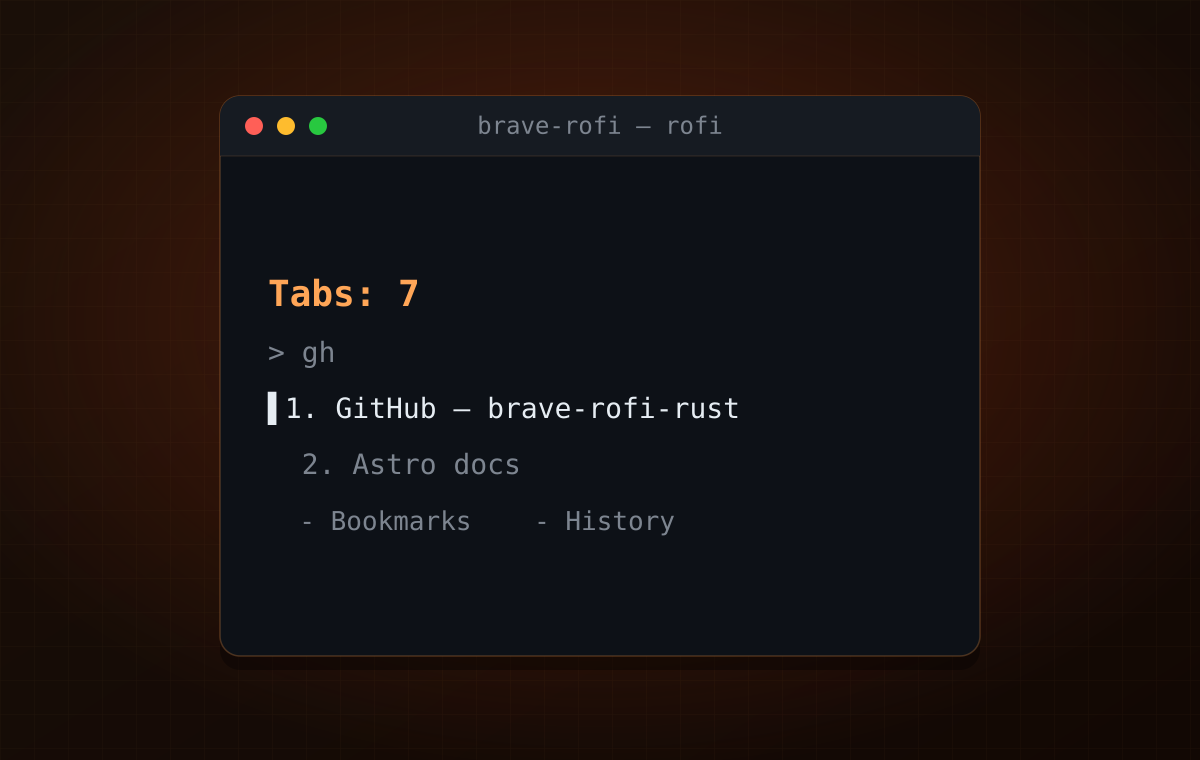
On macOS there’s an Alfred workflow for switching browser tabs: hit a hotkey from anywhere, fuzzy-search your open tabs, jump straight to one. On i3 with rofi I had nothing like it. The one purpose-built tool I found — brotab, which drives tabs from the CLI through a browser extension — never worked for me, for reasons I’ve since forgotten. Browser extensions and Puppeteer scripts on their own share a different problem: they mostly help once the browser is already focused. The whole point is to jump in when it isn’t.
So I built brave-rofi-rust — a small Rust program that puts your open tabs (plus bookmarks and history) into a rofi menu you can summon from any window. Pick a tab from your editor, your terminal, anything, and the browser comes forward on the right page.
What it does
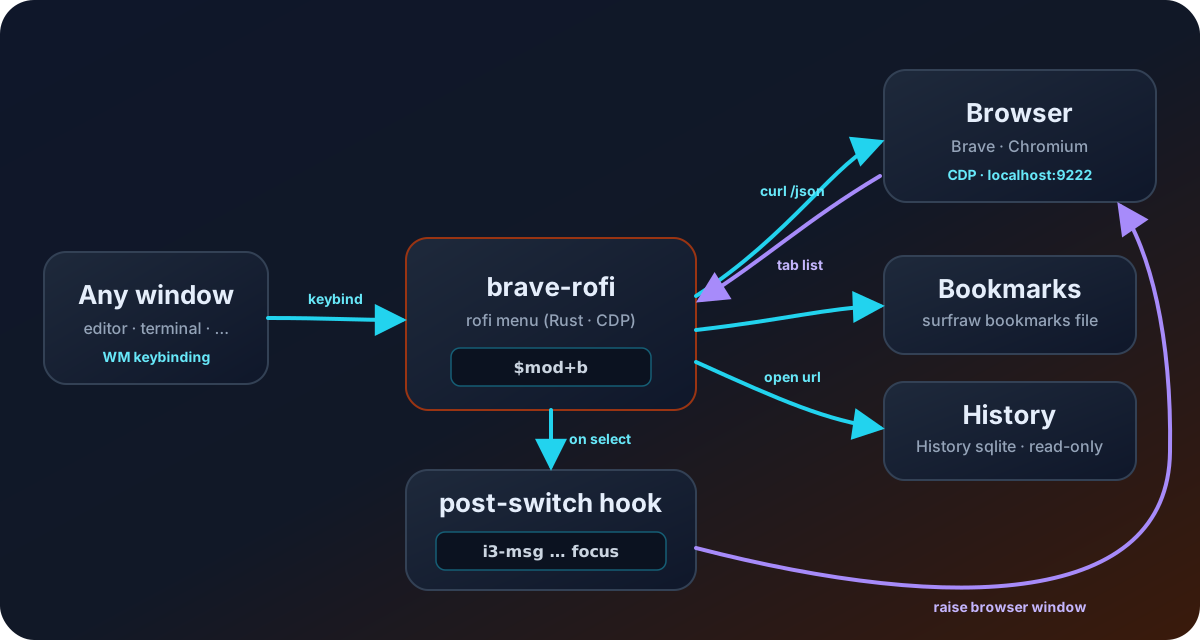
Bind brave-rofi to a key in i3 and it becomes a global switcher:
- Tabs — every open tab in a fuzzy menu; pick one and it’s activated.
- Bookmarks — open a bookmark from anywhere, regular or incognito.
- History — open a history entry from anywhere.
- Plus search (regular/incognito), a new tab, and multi-select close.
It supports the Chromium family — Brave Beta (default), Brave, and Chromium —
selected with a $BROWSER env var.
Why it takes two protocols
The interesting part is that “switch to that tab” is actually two different jobs, and no single tool does both.
The Chrome DevTools Protocol (CDP) can switch the active tab inside the
browser. brave-rofi asks the browser for its tab list over
http://localhost:9222/json (the browser has to be started with
--remote-debugging-port=9222), shows them in rofi, and on selection sends a
Target.activateTarget over a WebSocket. That focuses the right tab — but CDP
has no idea your window manager exists, so if the browser window is buried
behind your editor, nothing visible happens.
Raising the OS window is i3’s job, not CDP’s. So after the tab switch,
brave-rofi runs whatever you put in $BROWSER_POST_SWITCH_HOOK:
export BROWSER_POST_SWITCH_HOOK='i3-msg [class="Brave-browser"] focus'Splitting those two responsibilities — CDP for the tab, a user-supplied hook
for the window — is what keeps the tool working from any focused application,
and keeps it from being welded to i3. Swap the hook for swaymsg or wmctrl
and it works on sway or plain X11 too.
any focused window ──keybind──▶ brave-rofi ──curl──▶ /json (CDP tab list) │ rofi menu ──┤── tab → CDP Target.activateTarget ├── bookmark → launch $BROWSER <url> └── history → launch $BROWSER <url> │ ▼ $BROWSER_POST_SWITCH_HOOK → raise the browser windowBookmarks and history, the same way
Once tab switching worked from anywhere, it felt wrong that bookmarks and history didn’t. So I wired them through the same rofi-from-any-window path.
History is a direct descendant of an fzf snippet I wrote a while back —
Browse Brave Browser History. Same trick: the
browser keeps History locked in a SQLite database while it runs, so you copy
it to /tmp first, then query urls ordered by last_visit_time. That post
piped the results into fzf in a terminal; here the exact same query feeds a
fullscreen rofi menu you can open without touching the browser at all.
Bookmarks read from my surfraw bookmarks file
(~/.config/surfraw/bookmarks) — a plain name url text file I already keep,
so adding a bookmark is editing one line. Pick one in rofi and it opens in the
browser (or an incognito window), then the same post-switch hook raises it.
The state of it
I’ll be honest: this is a draft. It scratches my own itch and the repo shows it.
- Chromium-family only. Zen and other Firefox-based browsers speak a
different remote protocol and store history in a different schema
(
moz_placesinplaces.sqlite). I started Zen tab switching and never finished it — it’s one of a few half-built ideas still in there. - Dead code. There are leftovers and half-migrated paths from earlier approaches (the window-focusing logic used to be hardcoded to i3 before the generic hook) that I haven’t cleaned up.
- The name might change.
brave-rofi-rustdescribes where it started, not where it is — it already handles Chromium and isn’t really Brave-specific. If it grows into something more consistent and feature-rich, I’ll probably rename it. - CDP might be the wrong foundation. Making you launch the browser with
--remote-debugging-port=9222is a real papercut. A browser extension talking over native messaging — roughly how brotab works — would probably be a cleaner base than driving CDP from the outside, even at the cost of the single-static-binary simplicity. That’s the direction I’d explore in a rethink.
Take it as a working prototype of an idea I like, not a finished tool.
Try it
cargo install --git https://github.com/antlis/brave-rofi-rust.gitStart your browser with --remote-debugging-port=9222, set $BROWSER and
$BROWSER_POST_SWITCH_HOOK, then bind it in i3:
bindsym $mod+b exec --no-startup-id brave-rofiThe README has the full configuration and the current list of rough edges. Issues and PRs welcome — especially if you get Firefox/Zen switching working, because I didn’t.