Running a mesh network behind CGNAT and DPI
How I keep my homelab reachable from laptops and one old 32-bit Android phone that also has to be my DPI-bypass VPN device.
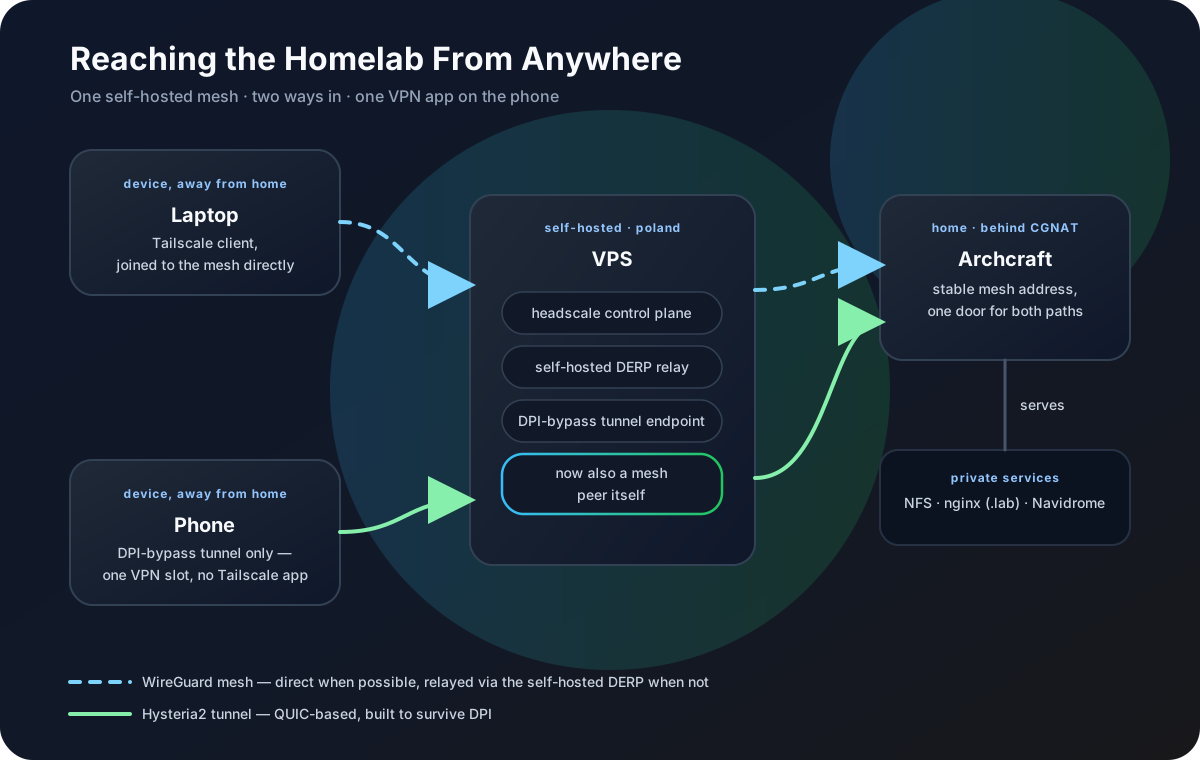
This started as a simple problem: I wanted reliable access to my homelab from anywhere.
In practice, the network was not simple at all. My home connection sits behind CGNAT. Public VPN protocols are often unreliable because of DPI filtering. And the main mobile client is an old 32-bit Android phone: modern mesh tools barely target that ARM generation anymore, but the same phone still has Android’s one-VPN-slot limit.
So the goal became more specific:
- keep the homelab reachable without opening ports at home
- make the setup work through CGNAT
- avoid relying on a public VPN protocol that gets blocked
- keep the phone usable without switching VPN profiles all day
- support one awkward 32-bit ARM client
The result is not a beautiful one-click setup. It is a practical one.
The Shape Of The Setup
I use a small VPS as the public entry point. The homelab connects out to it through a DPI-resistant tunnel. From there, a private mesh network handles the devices that need to talk to each other.
The important part is direction. Nothing has to dial into my home network directly. The homelab initiates the connection, the VPS stays reachable, and clients can join the private network from wherever they are.
That one decision removes a lot of pain. CGNAT stops mattering. Home router port forwarding stops mattering. If the ISP changes something upstream, the public side of the system is still the VPS.
Why Not Just Use A VPN?
A regular VPN would be the obvious answer if the network were friendly.
Mine is not.
Some protocols work for a while and then disappear behind filtering. OpenVPN can be slow or blocked. WireGuard is excellent when UDP is allowed, but that assumption is not always safe. I wanted something that looked boring enough to survive transport-level filtering and stable enough that I would not have to babysit it.
That is why the public transport is separate from the private mesh.
The DPI-bypass tunnel gets me from the homelab to the VPS. The mesh handles identity, device routing, and friendly names. They solve different problems, and keeping them separate makes the whole thing easier to debug.
The Mesh Layer
For the mesh, Headscale gives me the control plane I want without depending on a third-party coordination service. Clients still get the Tailscale-style experience: devices join, names resolve, and routes are easy to reason about.
The VPS becomes the place where the mesh can rendezvous. The homelab advertises the routes I need. Laptops and phones join the same private network and reach services by mesh address or name instead of public IPs.
For daily use, this matters more than it sounds. I do not want to remember where a service lives or which network I am currently on. I want to open the same address and get the same result.
The Phone Is The Hard Part
The awkward device in this setup is not a separate client or a spare board. It is the same phone I carry around.
That matters because it has two unrelated problems at once. First, it is a 32-bit armv7 Android phone, so a lot of modern builds simply do not target it anymore. Second, it still needs to run my DPI-bypass VPN for normal browsing, and Android only lets one app own the VPN interface at a time.
I tried the obvious Tailscale routes first. Stock binaries, packaged releases, and the easy cross-compile path all failed in different ways. Most of the ecosystem now assumes 64-bit ARM, which is reasonable in 2026 but not very helpful when the device in your hand is older and still works.
The practical path was to treat the phone as the constraint, not as an afterthought. The mesh design had to work with one Android VPN slot, not ask me to choose between internet access and homelab access every time I opened the phone.
One Phone, One VPN
If the phone runs a DPI-bypass VPN app and a separate mesh VPN app, one of them loses. That is not a bug in either app; it is how Android’s VpnService works.
The useful fix is to stop making the phone join the mesh directly. The phone keeps running the DPI-bypass tunnel it already needs. The VPS at the other end of that tunnel becomes a mesh peer. From there, outbound connections from the VPS can reach the homelab over the private mesh.
So the phone remains just a phone with one active VPN. When I need a homelab service, the path is already there: phone to DPI-bypass VPS, then VPS to homelab through the mesh.
That small shift is what makes the setup usable. The old 32-bit Android phone is not a second problem next to the VPN-slot problem; it is the same device forcing both constraints at once.
NFS And The Certificate Trick
One nice side effect is that local services can stay local.
For example, NFS does not need to become a public-facing service. The mesh carries the private traffic. For browser-facing tools, I can put a small HTTPS layer in front and use a wildcard certificate where it makes sense.
The public internet sees very little. The private network still feels convenient. That is the balance I wanted.
What I Like About This Design
It is boring in the right places.
The VPS has a public address. The homelab connects outward. The mesh gives me device identity and stable names. The DPI-resistant tunnel deals with hostile transport. Each part has one job.
When something breaks, I can ask a simple question:
- is the tunnel from home to the VPS alive?
- is the mesh control plane reachable?
- did the client join the mesh?
- is the route advertised?
That is much easier than debugging one giant VPN configuration where transport, identity, routing, and device compatibility are all tangled together.
Trade-Offs
There are trade-offs.
The VPS is now important. If it goes down, remote access goes down with it. The setup also has more moving pieces than a normal home VPN. And supporting old 32-bit Android hardware adds maintenance that most people should probably avoid.
For me, those costs are acceptable. I get stable remote access, no inbound ports at home, a working phone setup, and a path that survives the networks I actually use.
That is the part that matters. A homelab is only useful remotely if you can reach it when conditions are bad, not just when everything is friendly.