I Gave My Portfolio an MCP Server
Why and how I built an MCP server on top of my personal website — so AI assistants can query my projects, experience, and technical work directly.
I recently started playing more with AI agents and MCP, and at some point I had a simple thought:
Why not give my personal website an MCP server?
There is not a huge problem I am trying to solve here. My website is not particularly large, and I do not have thousands of articles or some massive knowledge base that desperately needs AI-powered search.
I just thought it would be a fun thing to build.
And since I already had a website with projects, articles, and other content, it seemed like a good place to experiment with MCP.
The idea
The website is an Astro project, and most of the content is stored as Markdown/MDX in its Git repository.
I wanted to keep that as the source of truth and build a small MCP server on top of it.
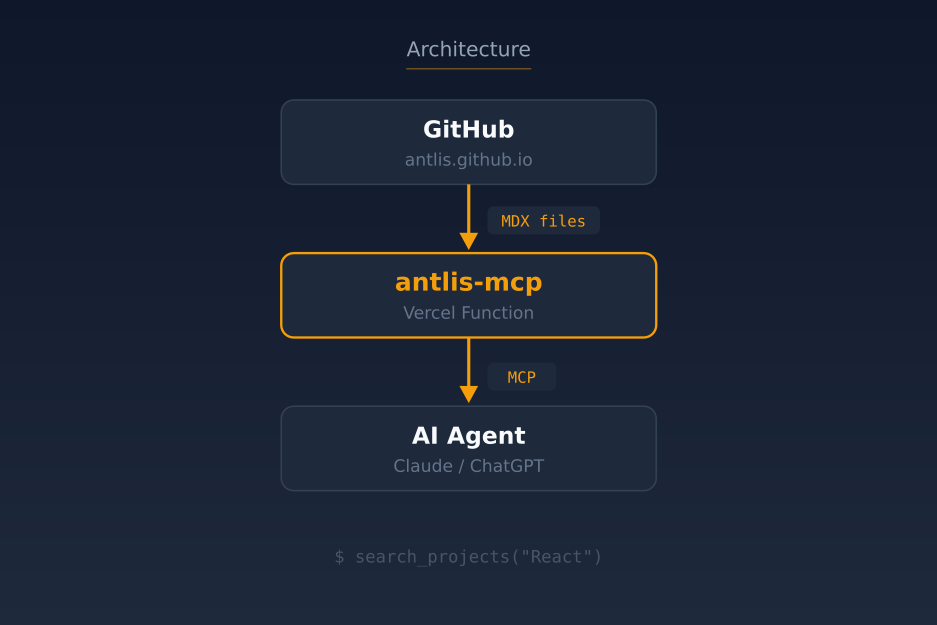
The basic idea is:
Nothing particularly sophisticated.
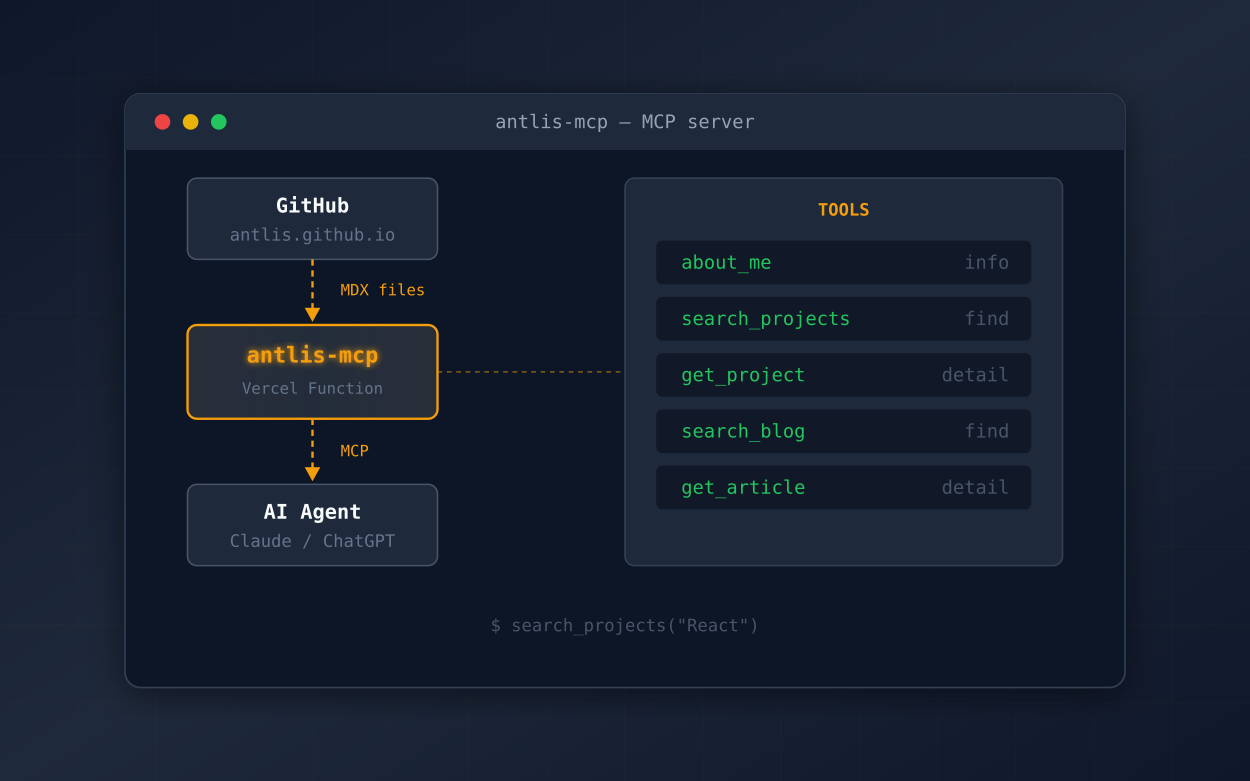
The MCP server reads the content from the repository and exposes some useful operations to AI clients.
The tools
I started with five tools:
about_mesearch_projectsget_projectsearch_blogget_articleThe project search can find things based on technologies, topics, descriptions, and other project information.
The blog search works similarly, while get_project and get_article return the full data for a specific item.
For example, an AI agent can call:
search_projects("React")and get structured project information back.
Or:
get_article("ai-harness-setup")to retrieve an entire article.
That is basically the whole first version.
Why GitHub?
Because that is where the content already lives.
I did not want to introduce a database just for this project, and I did not want to maintain a second copy of my website’s content somewhere else.
The repository already contains the Markdown/MDX files, so the MCP server can just read them.
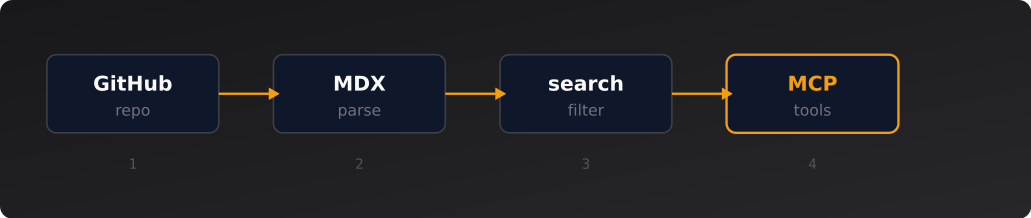
For projects, I fetch the repository tree, find the project MDX files, parse their frontmatter, and expose the useful fields.
The blog works the same way.
This also means that updating the website automatically updates the information available through MCP after the server picks up the new repository contents.
Keeping it simple
Since this is mostly an experiment, I deliberately avoided throwing a bunch of AI infrastructure at it.
No vector database.
No embeddings.
No RAG pipeline.
No LLM inside the MCP server.
The amount of content is small enough that basic search is perfectly reasonable.
The implementation is essentially:
I can always make it more sophisticated later if I actually run into a problem that requires it.
For now, I would rather have a small project that is easy to understand.
Deploying to Vercel
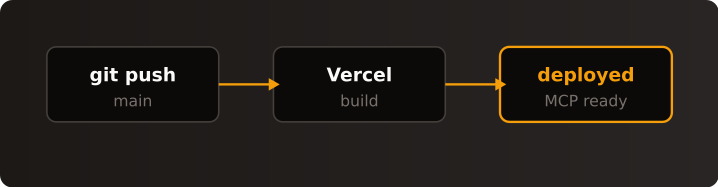
I deployed the MCP server as a Vercel function.
The endpoint is:
https://antlis-mcp.vercel.app/api/mcpThe server is written in TypeScript and uses the MCP SDK ecosystem together with mcp-handler.
The repository is connected to Vercel as well, so now the deployment process is basically:
Nice and boring.
Connecting it to a Telegram AI bot
The next thing I wanted to try was connecting the MCP server to an AI agent I already use.
I have a Telegram AI bot running through Hermes, and Hermes supports MCP servers.
So I added the remote MCP endpoint to it.
The architecture now looks like this:
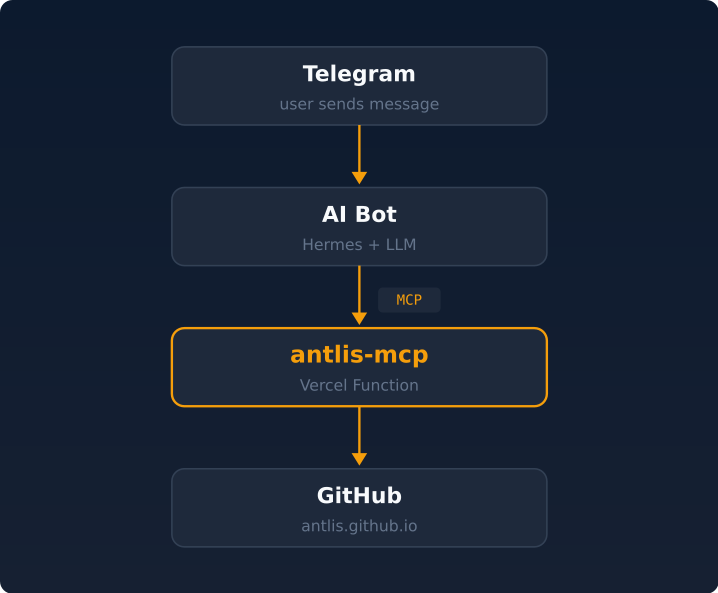
After connecting it, the bot discovered all five tools.
That was already a nice confirmation that the server was doing what it was supposed to do.
But obviously, just seeing the tools is not particularly interesting.
I wanted the bot to actually use them.
The first real test
I asked the bot:
What projects demonstrate React experience?
The agent decided that it needed information from my website and called the MCP search tool with a React query.
The MCP server searched the project data and returned a matching project.
The bot then used the result to formulate its answer.
So the actual flow was:
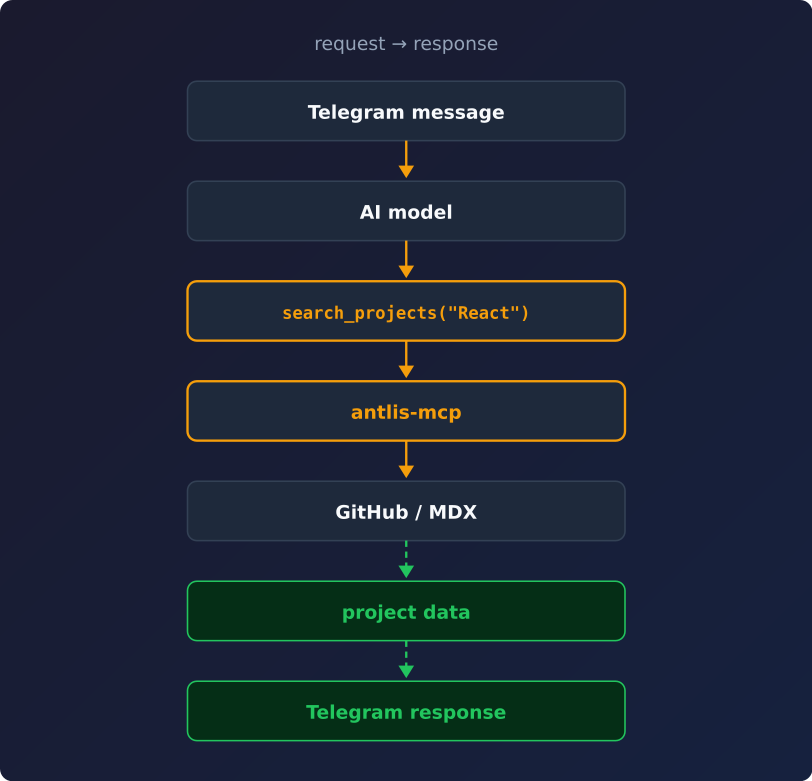
That is the part I was interested in.
I did not explicitly tell the bot how to find the information.
It discovered that it had a tool available and decided to use it.
A slightly harder test
Then I asked:
Which projects would be strongest for a Senior React/Next.js position? Give me the reasoning and use the portfolio data, not your prior knowledge.
Again, it queried the MCP server and got the project information.
The answer was reasonable, but the test also exposed something that I think is important when building these kinds of systems.
The model started making some assumptions that were not actually present in my source data.
For example, it inferred some architectural details from the fact that a project used Next.js.
That is a good reminder that MCP does not magically prevent hallucinations.
The MCP server can provide accurate information, but the model can still interpret that information too aggressively.
So I think a good design principle here is:
MCP → facts and evidence
LLM → interpretation and explanation
If my project data says that something used React and Next.js, the MCP server should return exactly that.
It should not try to turn it into a claim about SSR, SSG, state management, or some other architecture unless that information is actually available.
The model can make the connection itself, but it should be clear when it is making an inference.
What is next?
There are a few directions I would like to experiment with.
One obvious one is a higher-level tool such as:
recommend_for_roleInstead of just searching for React projects, I could ask the MCP server for projects relevant to:
Senior React / Next.js DeveloperThe server could rank projects based on their actual metadata and return the evidence behind each match.
I would also like to experiment with MCP resources and prompts.
For example, resources could expose things like:
portfolio://projects/topforexportfolio://projects/tg-mpv-botportfolio://articles/ai-harness-setupAnd prompts could provide reusable workflows around things like job matching or interview preparation.
But I do not want to turn this into a huge project just for the sake of adding features.
The small version is already useful enough as an experiment.
Why I wanted to build this
Honestly, the main reason is that MCP is interesting.
I use AI agents quite a lot, and I have been experimenting with different ways of giving them access to information and tools.
Building an MCP server for something I already own seemed like a much better way to learn it than building another toy example.
Instead of:
"Hello world" MCP serverI have something that actually connects to my own stuff.
And now the same content can have two very different interfaces:
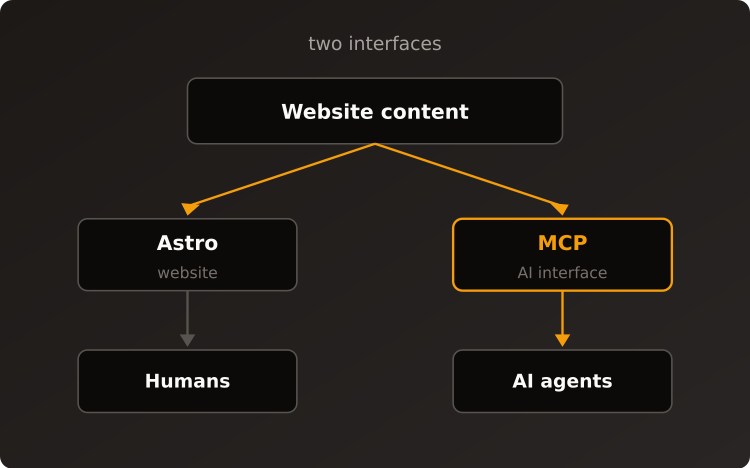
The website does not need to know anything about the AI agent.
The AI agent does not need to know how the website is implemented.
The MCP server sits between them and exposes the parts that make sense for an agent to use.
That is a pretty neat pattern.
Where it stands now
The current implementation is deliberately small:
antlis-mcp│├── about_me├── search_projects├── get_project├── search_blog└── get_articleIt is deployed on Vercel, backed by the same Git repository as the website, and I have successfully connected it to my Telegram AI bot.
The source code is available on GitHub: antlis/antlis-mcp
So now I can ask the bot something about my own projects, and instead of relying only on whatever context it already has, it can go and query the actual source.
Try it yourself
Instead of just explaining what the MCP does, I embedded a small client for it right here. Ask it something about the website.
The widget sends your question to an LLM, which decides which MCP tools to call, fetches the data from the server, and answers based on what it finds. You can expand the tool call cards to see exactly what was queried and what came back.
I later wrote up how that widget works end to end — the frontend, wiring it to OpenRouter, and making it stream its answer like ChatGPT: Making My Portfolio Chat Widget Stream Like ChatGPT.
Where it stands now
That is enough for now.
I will probably keep extending it as I find interesting things to try with MCP.
And that is really the point of the project — I wanted to learn how MCP works by giving something I already have an AI interface.
Turns out, it is pretty fun.