Making My Portfolio Chat Widget Stream Like ChatGPT
Building the chat widget, wiring it to OpenRouter with tool calls, then moving from a blocking response to Server-Sent Events — this time owning the backend, not just the frontend.
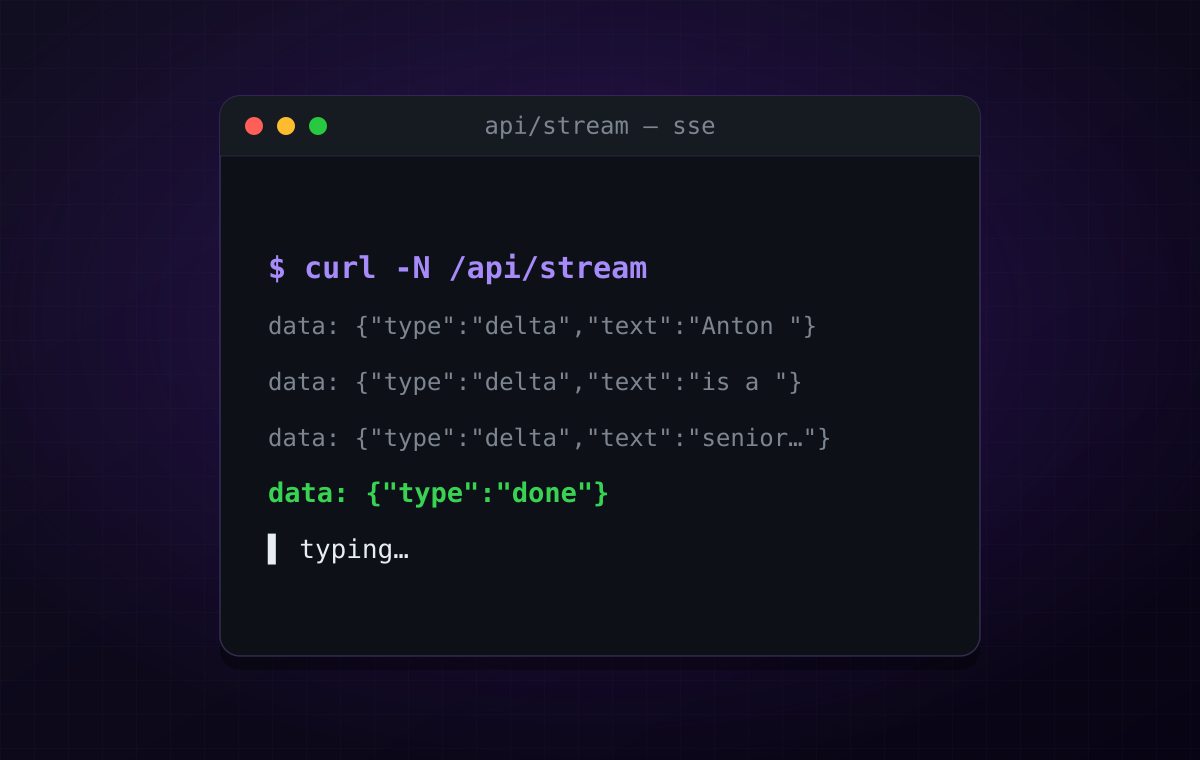
In the previous post I gave my portfolio an MCP server and, at the end, embedded a small chat widget so you could actually try it. That widget does not drop a finished answer on you. It types the answer out, word by word, the way ChatGPT does.
This post is how that widget got built — the frontend bubble, wiring it to a real LLM through OpenRouter, and then the part I was actually curious about: making it stream.
I’d already built half of this
Here is the honest bit. I had built something like this before — a little in-page assistant that summarized a dashboard for the user. But I only ever owned the frontend half of it. The tokens arrived as a stream, I appended them to a bubble, and it looked great. The backend that produced that stream — the model calls, the tool orchestration, the actual data: frames — was somebody else’s box that I just consumed.
So I knew how to render a stream. I had never served one.
This time I wanted both ends. My own endpoint, my own tool loop, my own SSE. On my own tiny portfolio, where breaking things in production costs nothing.
Part 1 — the widget
The frontend is the easy part, and mostly unremarkable: a floating bubble, a message list, an input. Two details are worth calling out.
Markdown. An LLM answers in Markdown, so the widget parses it with marked and sanitizes the result with DOMPurify before it ever touches innerHTML. Sanitizing is not optional — you are putting model output into the DOM.
An Astro gotcha that cost me an hour. I first wrote the client logic inside a <script define:vars={{ apiBase }}> block, so I could pass the server URL in. That script is rendered inline, and inline scripts are not bundled — so the import of marked simply never resolved. The fix is to use a plain bundled <script> and hand server values in through a data- attribute:
<div id="chat-widget" data-api-base={apiBase}>…</div>
<script>  import { marked } from 'marked'  import DOMPurify from 'dompurify'  const widget = document.getElementById('chat-widget')!  const apiBase = widget.dataset.apiBase</script>
Boring once you know it. Baffling for an hour if you don’t.
Part 2 — wiring OpenRouter
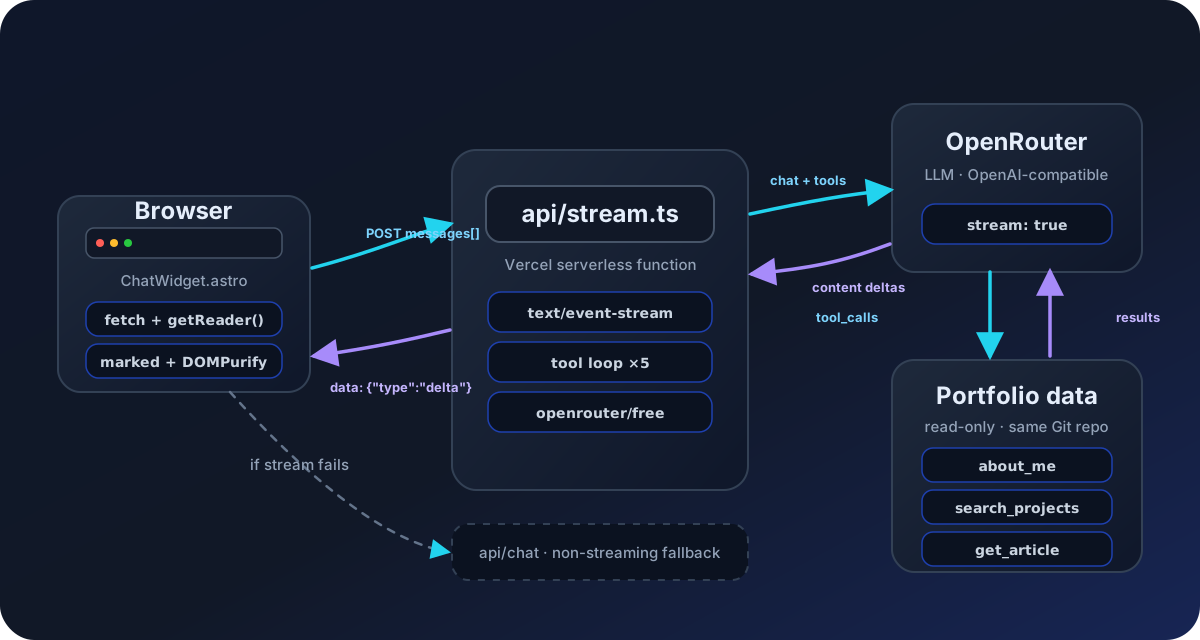
The backend is a single Vercel serverless function. It takes the conversation, adds a system prompt, and calls OpenRouter — which speaks the OpenAI-compatible API, so the same request shape works across models. I use the free tier and a small set of read-only tools that read from the same Git repo the website is built from:
about_mesearch_projectsget_projectsearch_blogget_articleThe loop is the standard tool-calling dance: send the messages and the tool definitions, and if the model comes back asking to call a tool, run it, append the result, and ask again. Up to a handful of iterations, then answer.
The first version was blocking. One POST, wait for the whole thing, return JSON. It worked. But an LLM that has to think, call a tool, read the result, and then write three sentences can easily take several seconds — and for all of those seconds the widget just sat there spinning. Which brings us to the interesting part.
Part 3 — does ChatGPT actually use SSE?
Yes. When you watch ChatGPT type, the browser is holding one long HTTP response open and the server is pushing small chunks down it as Server-Sent Events — a stream of text/event-stream where each event is a line that starts with data:. That is the whole trick. There is no websocket, no polling. Just a response that refuses to finish.
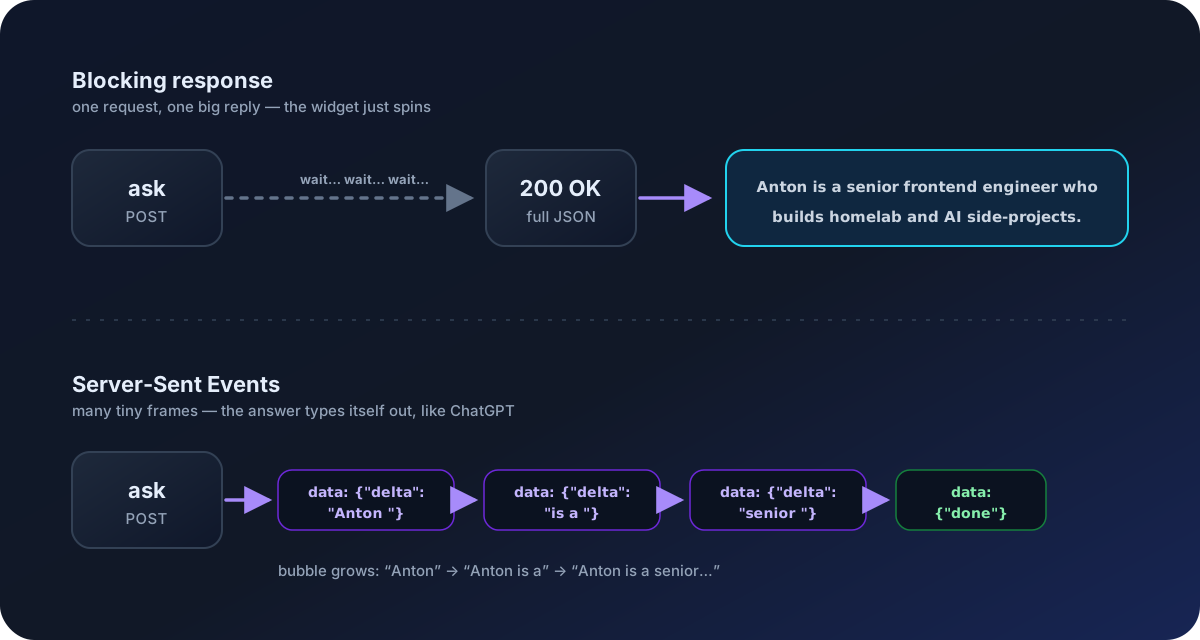
The one catch: the browser’s native EventSource can only do GET and can’t set headers, and I need to POST a conversation. So on the client I don’t use EventSource at all — I use fetch and read the response body as a stream:
const res = await fetch(apiBase + '/api/stream', {  method: 'POST',  headers: { 'Content-Type': 'application/json' },  body: JSON.stringify({ messages: conversation }),})
const reader = res.body!.getReader()const decoder = new TextDecoder()let buffer = ''
while (true) {  const { value, done } = await reader.read()  if (done) break  buffer += decoder.decode(value, { stream: true })  const lines = buffer.split('\n')  buffer = lines.pop() ?? ''          // keep the last, possibly-incomplete line  for (const line of lines) {    if (!line.startsWith('data:')) continue    const evt = JSON.parse(line.slice(5))    if (evt.type === 'delta') { answer += evt.text; render() }  }}
On the server, “emitting an event” is just a write:
const send = (obj) => res.write(`data: ${JSON.stringify(obj)}\n\n`)Plus the right headers so nothing in the middle decides to buffer your stream into one lump: Content-Type: text/event-stream, Cache-Control: no-cache, no-transform, and X-Accel-Buffering: no.
The part that actually needed thinking
Streaming a plain chat reply is trivial. Streaming a reply that runs a tool loop first is not, because a single conversation now has two very different kinds of turn:
- a tool turn, where the model emits
tool_callsfragments and no prose, and - the answer turn, where it finally writes text for the human.
If you naively forward every content delta, you either leak nothing (tool turns have no content) or, worse, you start streaming a half-formed thought the model later revises. What I want on the wire is only the final answer. So the server tracks a toolMode flag and forwards content only when it isn’t mid-tool-call:
if (Array.isArray(delta.tool_calls)) toolMode = true
// tool turns carry tool_calls, not prose — only stream real answer textif (typeof delta.content === 'string' && !toolMode) {  send({ type: 'delta', text: delta.content })}
When the loop finally finishes with no more tool calls, it sends one { type: 'done' } and ends the response. Here is the whole shape:
Keeping the old endpoint as a net
I didn’t delete the blocking version. The original /api/chat still exists, untouched, and the widget falls back to it if the stream fails, returns a bad status, or has no body. Streaming is the nice path; the boring path is the safety net. It costs almost nothing to keep and means a flaky stream degrades to a working answer instead of an error.
The small thing that made it feel finished
Even with streaming, there are gaps — the model pauses, a tool runs, a chunk is slow. In those gaps a half-written bubble looks frozen, like the tab hung. The fix is an animated three-dot typing indicator that lives inside the bubble and trails the text for the entire stream, only disappearing on done. It’s a few lines of CSS, and it’s the difference between “is this broken?” and “it’s thinking.”
Where it landed
The result is the widget at the bottom of the MCP post — and right here too. Ask it something about my projects or articles. It sends your question to the model, the model decides which portfolio tools to call, and the answer types itself back to you over SSE.
None of this is novel — SSE is old, tool loops are well-trodden. But I finally built the half I’d always let someone else handle, and it turns out the “magic” ChatGPT typing effect is a response you just don’t close.
See also: I Gave My Portfolio an MCP Server — the backend this widget talks to.